

Skip to content
Tape Measure app icon

Tape Measure · Ruler app for iPhone

Use your phone as a ruler

Measure small things right on your iPhone's screen, in inches and centimeters. For anything bigger than your phone, switch to the AR ruler and measure through the camera.

Download Tape Measure on the App StoreDownload Tape Measure on the App Store

Free · iPhone

On-screen ruler measuring a coin at 1.94 inches or 4.9 centimeters
  • On-screen ruler

    For coins, screws and beads

  • AR ruler

    Point and tap for bigger things

  • Inches and centimeters

    Both readings side by side

  • Ring size measure

    Measure a ring you already own

How it works

How to use your iPhone as a ruler

  1. On-screen ruler with inch and centimeter scales
    1

    Open the ruler

    Open Tools in Tape Measure and choose the ruler. Lay your iPhone flat on a table so nothing slides around.

  2. On-screen ruler measuring a coin at 1.94 inches or 4.9 centimeters
    2

    Place the object and move the markers

    Put the coin, screw or bead on the screen, then move the two markers to its edges. Look straight down for the most accurate reading.

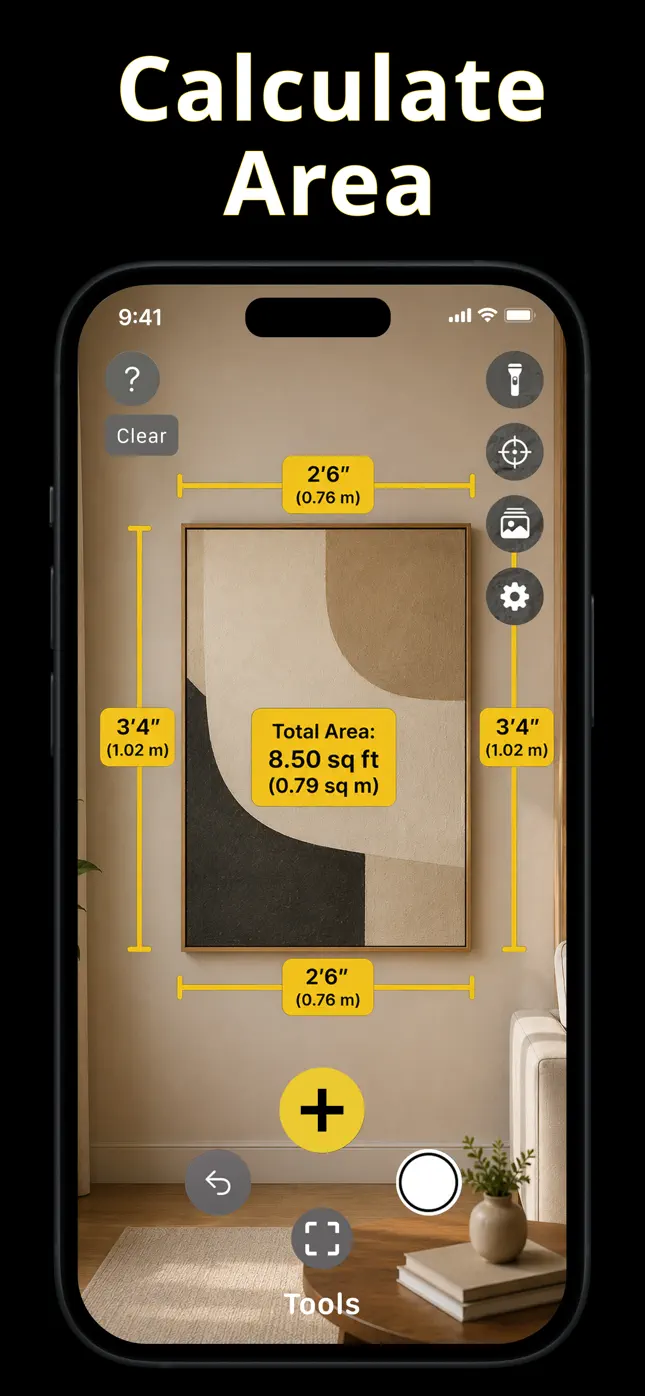
  3. Tape Measure showing the width, height and total area of a framed picture on a wall
    3

    Read the size

    The size shows in inches and centimeters at the same time. For something longer than your screen, switch to the tape measure and use the camera.

Phone ruler

A ruler on your screen for small things

No ruler in the drawer? Place a coin, screw, bead or button on your iPhone's screen and move the markers to its edges to read its size. It's handy for small parts, crafts and quick checks.

  • Coins, screws, beads and buttons
  • No camera needed
  • Tip: lay the phone flat and look straight down
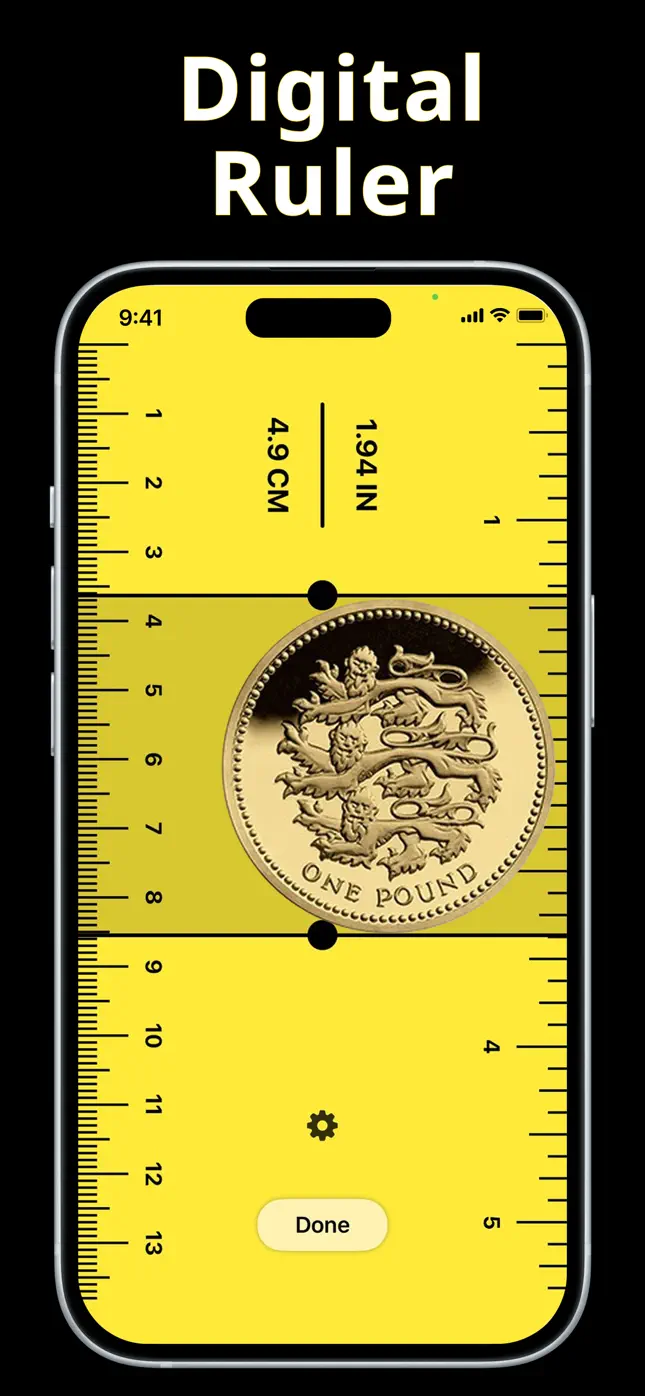
On-screen ruler measuring a coin at 1.94 inches or 4.9 centimeters

AR ruler app

Measure bigger things through the camera

When something is longer than your phone, use the AR tape measure. Aim at the starting point and tap the plus button, move to the end point and tap again. The length appears on screen as you go.

  • Length and distance, point to point
  • Area, angles and height too
  • Imperial or metric units
Tape Measure showing the width, height and total area of a framed picture on a wall

Ruler in inches

Inches and centimeters side by side

The on-screen ruler shows inches on one side and centimeters on the other, with both readings at the top. You don't have to convert anything or switch settings to get the size in the unit you need.

  • Inch and centimeter scales on the same screen
  • Both readings shown at once
  • Handy for parts sold in either unit
On-screen ruler measuring a coin at 1.94 inches or 4.9 centimeters

How to measure a screw

Measure a screw on your screen

Lay the screw flat on the ruler and move the markers to its ends. Where you start depends on the head, because a screw's length is the part that sits in the material.

  • Pan, round and hex heads: from under the head to the tip
  • Flat (countersunk) heads: the full length, head included
  • Diameter: measure across the outside of the threads
On-screen ruler measuring a coin at 1.94 inches or 4.9 centimeters

Ring size measure

Find the size of a ring you own

Ring Size Measure works with the on-screen ruler. Lay a ring you already own flat on the screen and Tape Measure measures its inside diameter. Match that to a ring size chart when you're shopping for a new ring.

  • Uses a ring you already own
  • Pick one that fits the right finger well
  • For an important purchase, confirm with a jeweler
On-screen ruler measuring a coin at 1.94 inches or 4.9 centimeters

Good to know

How accurate is a phone ruler?

Tape Measure is great for quick checks and planning, but like any measuring tool it can get things wrong, especially if the object moves or you look at it from an angle.

  • On the screen: lay the phone flat and look straight down at the object
  • With the camera: good light, a textured surface and a steady hand help
  • When a millimeter matters, check with a physical ruler or calipers

Double-check the size before you cut, drill or order a part that has to fit exactly.

Who it's for

For quick measuring, wherever you are

  • DIY and repairs

    Check a screw, bolt or washer before you buy a replacement.

  • Crafters

    Measure beads, buttons and charms for jewelry and sewing projects.

  • Shoppers

    Check the size of a small item when there's no ruler around.

  • Students

    A ruler on your phone for homework and school projects.

FAQ

Questions about using your phone as a ruler

Something else? Email us at [email protected].

Can I use my phone as a ruler?

Yes. With Tape Measure, small things go right on the screen: place the object, move the markers to its edges and read the size in inches and centimeters. For bigger things, the AR ruler measures through the camera.

Does the iPhone have a ruler?

iPhones come with Apple's Measure app, which measures through the camera. For small things you can lay on the screen, such as a coin or a screw, an on-screen ruler like the one in Tape Measure is easier to use.

How do I measure with my iPhone?

For something small, open the ruler in Tape Measure, lay the object on the screen and move the markers to its edges. For something bigger, open the tape measure, aim at the starting point and tap the plus button, then move to the end point and tap again.

What is an AR ruler app?

AR stands for augmented reality. An AR ruler uses your phone's camera to place measuring points on real surfaces, so you can measure a table, a wall or a doorway without touching it. Tape Measure's AR tape measure also measures area, angles and height.

How do I measure a screw?

For pan, round and hex heads, measure from just under the head to the tip. For flat (countersunk) heads, measure the full length, head included, because the head sits in the material. Measure the diameter across the outside of the threads.

How do I measure something without a ruler?

Use your phone. Tape Measure has an on-screen ruler for small things and an AR tape measure for bigger ones, so you can get a size in inches or centimeters without a physical ruler.

How accurate is a phone ruler?

It's accurate enough for quick checks and planning. Lay the phone flat and look straight down at the object for a clear reading. When a millimeter matters, such as ordering a part that has to fit exactly, confirm with a physical ruler or calipers.

Is the phone ruler free?

The ruler is part of Tape Measure. Free to download and try.

Which devices does it work on?

Tape Measure is an iPhone app.

Turn your iPhone into a ruler

Free to download and try.

Download Tape Measure on the App Store
See everything Tape Measure does

Privacy policy·Terms of service