

Skip to content
Paraphrase Tool app icon

Paraphrase Tool · AI bio generator for iPhone, iPad and Mac

AI bio generator for Instagram, TikTok, LinkedIn and dating apps

Tell it a few things about yourself, pick a platform and a tone, and get a bio that sounds like you. Paraphrase Tool writes for 10 platforms, from Instagram and TikTok to Tinder, Bumble and Hinge.

Download Paraphrase Tool on the App StoreDownload Paraphrase Tool on the App Store

Free · iPhone, iPad and Mac

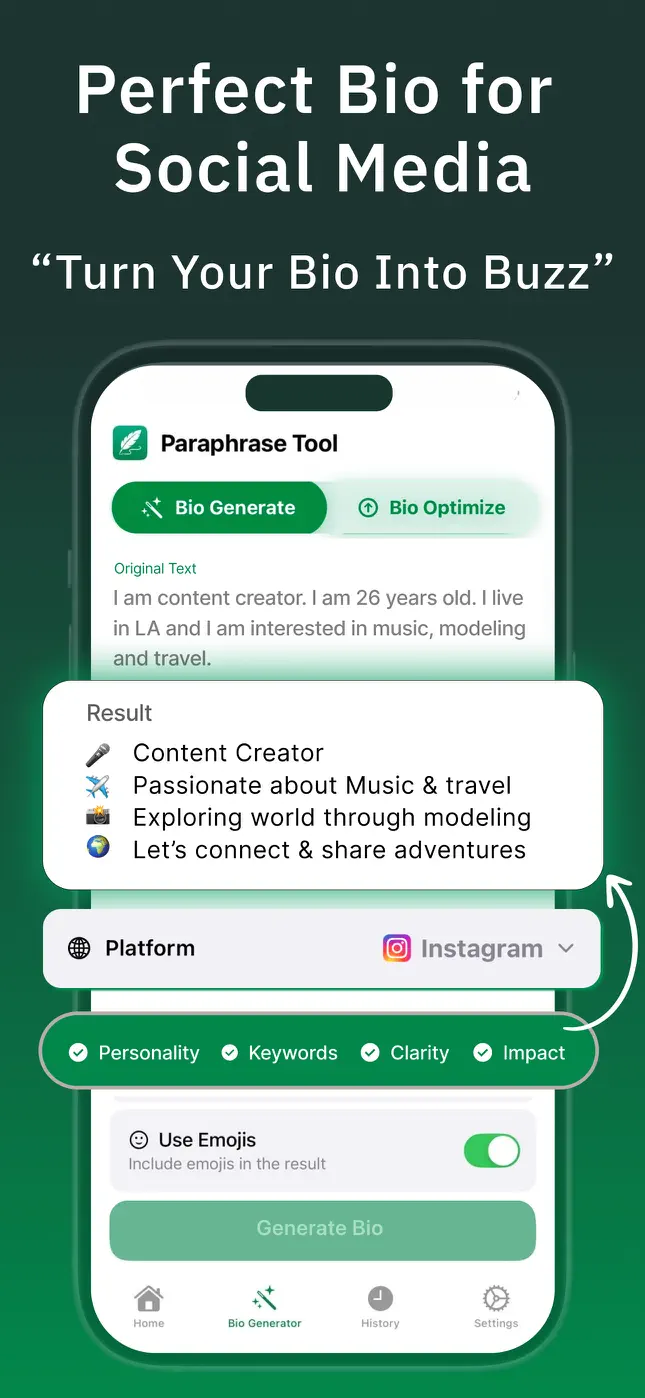
Bio generator turning a short description of a content creator into an Instagram bio
  • 10 platforms

    Social, professional and dating apps

  • Fits the limit

    Every bio fits the platform's character limit

  • Your tone

    Professional, casual or flirty, emojis optional

  • Saved to history

    Every bio kept on your device

How it works

How to write a bio with AI

  1. Bio generator with a short description of a content creator and Platform set to Instagram
    1

    Pick a platform and add a few details

    Choose where the bio will go, then write a line or two about yourself: what you do, what you love and who you want to reach.

  2. Bio settings with Platform set to Instagram, Tone set to Professional and Use Emojis switched on
    2

    Choose a tone

    Go professional, casual or flirty, and switch emojis on or off.

  3. Generated Instagram bio for a content creator
    3

    Get your bio

    Read it, keep it or generate again with a different tone. Every bio is saved to your history, so you can come back to it later.

Instagram bio generator

An Instagram bio that says who you are

You have one short paragraph to tell people why they should follow you. Add what you do and who it's for, and the bio generator writes it to fit Instagram's 150 characters.

  • Home baker: 'Small-batch sourdough, baked before sunrise. Fresh loaves Friday to Sunday. Order by DM.'
  • Travel photographer: 'Chasing good light in small towns. Slow travel, film photos and too much coffee.'
  • For creators, small businesses and personal accounts
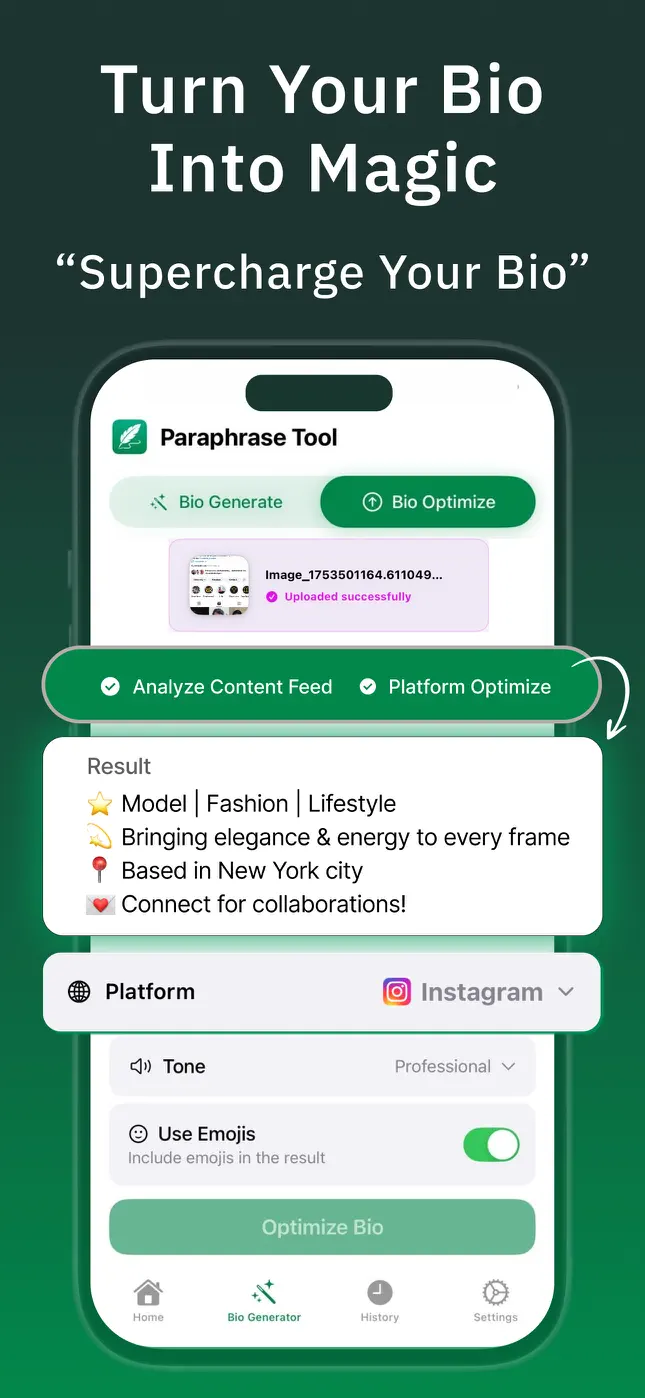
Bio optimizer with an uploaded profile screenshot and an improved Instagram bio for a fashion model

TikTok bio generator

TikTok bios short enough to read at a glance

TikTok gives you 80 characters, so every word has to count. Pick TikTok and you get a short line that tells people what your videos are about.

  • Cooking account: 'Easy dinners in 15 minutes or less. New recipe every weekday.'
  • Personal account: 'Nurse by day, terrible dancer by night.'
  • Pick a casual tone for a lighter feel
Bio Generate screen with Instagram selected and a generated bio

LinkedIn summary generator

A LinkedIn bio for your About section

Your About section is where recruiters and clients get a feel for you. Pick LinkedIn and a professional tone, add your role and experience, and get a clear summary of what you do.

  • Freelance analyst: 'I help small businesses turn messy spreadsheets into clear monthly reports. Eight years in finance, three of them freelance. Open to new projects.'
  • Good for job seekers, freelancers and founders
  • Use it as your LinkedIn summary or a short professional bio
Bio generator turning a short description into a bio, with Platform set to Instagram

Tinder bio generator

Dating bios for Tinder, Bumble and Hinge

Writing about yourself for a dating app is hard. Add a few things you like and pick a flirty or casual tone. For Tinder and Bumble you get a bio, and for Hinge you get answers to your prompts.

  • Tinder: 'Weekend hiker, weekday coffee snob. Looking for someone to split a pizza with and argue about the best trail.'
  • Hinge prompt answer: 'My simple pleasures: Saturday farmers markets, a good paperback and the first coffee of the day.'
  • Bumble: 'Teacher who bakes too much on Sundays. Ask me about my banana bread.'
Bio optimizer with Tone set to Professional and an improved bio in the result box

YouTube channel description generator

YouTube, X, Facebook and Pinterest too

For YouTube, the app writes a channel description that tells viewers what to expect and when. It also writes bios for X (Twitter), Facebook and Pinterest.

  • YouTube: 'Beginner woodworking projects you can build in a garage with basic tools. New videos every Tuesday.'
  • X (Twitter): 'Product designer. Writing about small apps, clear type and better coffee.'
  • Pinterest: 'Cozy small-space decor and renter-friendly DIY ideas.'
Bio generator turning a short description into a bio, with Platform set to Instagram

Bio optimizer

Already have a bio? Make it better

Paste your current bio or upload a screenshot of your profile. The bio optimizer rewrites it for the platform and tone you pick, so you don't have to start from scratch.

  • Paste text or upload a profile screenshot
  • Rewritten for the platform you choose
  • Keep or drop the emojis
Bio optimizer with an uploaded profile screenshot and an improved Instagram bio

Good to know

Read it before you post it

The bio generator only knows what you tell it, and like any AI tool it can get the wording wrong. Treat the result as a strong first draft and make it yours.

  • Check that every detail is true, especially on dating apps
  • Leave out your address, phone number and other private details
  • Change any word that doesn't sound like you

Your bios are kept in History, which is stored on your device, not on our servers.

Who it's for

For anyone who has to write about themselves

  • Creators

    A clear Instagram, TikTok or YouTube intro that tells people what you post.

  • Small businesses

    Say what you sell and how to order in one short line.

  • Job seekers and freelancers

    A LinkedIn bio for your About section that reads like you, only sharper.

  • Dating app users

    A Tinder or Bumble bio, or Hinge prompt answers, when you don't know where to start.

FAQ

Questions about the AI bio generator

Something else? Email us at [email protected].

Which platforms does the bio generator support?

Ten: Instagram, Facebook, X (Twitter), LinkedIn, TikTok, YouTube, Tinder, Bumble, Hinge and Pinterest. For YouTube it writes a channel description, and for Hinge it writes prompt answers. Every bio fits the platform's character limit.

How long can an Instagram bio be?

An Instagram bio can be up to 150 characters. That's about one or two short sentences, so lead with who you are and what people will find on your profile.

How long can a TikTok bio be?

A TikTok bio can be up to 80 characters, about half the length of an Instagram bio. One short line about what your videos are about works best.

What should I put in my Instagram bio?

Say who you are or what you do, what people will find on your profile, and give them a reason to follow or get in touch. Keep it specific: 'Sourdough baked fresh every Friday' says more than 'I love baking'. In the bio generator, pick Instagram, add those details and choose a tone.

Can it write a LinkedIn summary?

Yes. Pick LinkedIn and it writes a bio for your About section, the part of your profile many people call the LinkedIn summary. A professional tone usually works best there.

Can it write a Tinder, Bumble or Hinge profile?

Yes. It writes bios for Tinder and Bumble, and answers to your Hinge prompts. Add a few things you enjoy, pick a flirty or casual tone, and make sure every detail is true before you post it.

Can it improve the bio I already have?

Yes. The bio optimizer takes your current bio, pasted as text or from a screenshot of your profile, and rewrites it for the platform and tone you choose.

Is the bio generator free?

The bio generator is part of Paraphrase Tool. Free to download. You can try the bio generator for free.

Which devices does it work on?

Paraphrase Tool runs on iPhone, iPad and Mac.

Write your next bio in a few taps

Free to download. You can try the bio generator for free.

Download Paraphrase Tool on the App Store
See everything Paraphrase Tool does

Privacy policy·Terms of service